Introduction
You have probably heard the term vector database thrown around a lot in AI conversations lately — but what exactly is it, and why does every AI application seem to need one in 2026?
If you have ever wondered how ChatGPT remembers context, how Netflix recommends exactly the right show, or how Google finds images similar to a photo you uploaded — the answer in most cases is a vector database working behind the scenes.
This complete vector database explained 2026 guide breaks down everything in plain, simple language — no PhD required. By the end, you will understand what vector databases are, how they work, why they are different from regular databases, which tools are best, and exactly where they are being used in the real world today.
Table of Contents
What is a Vector Database? (Simple Definition)
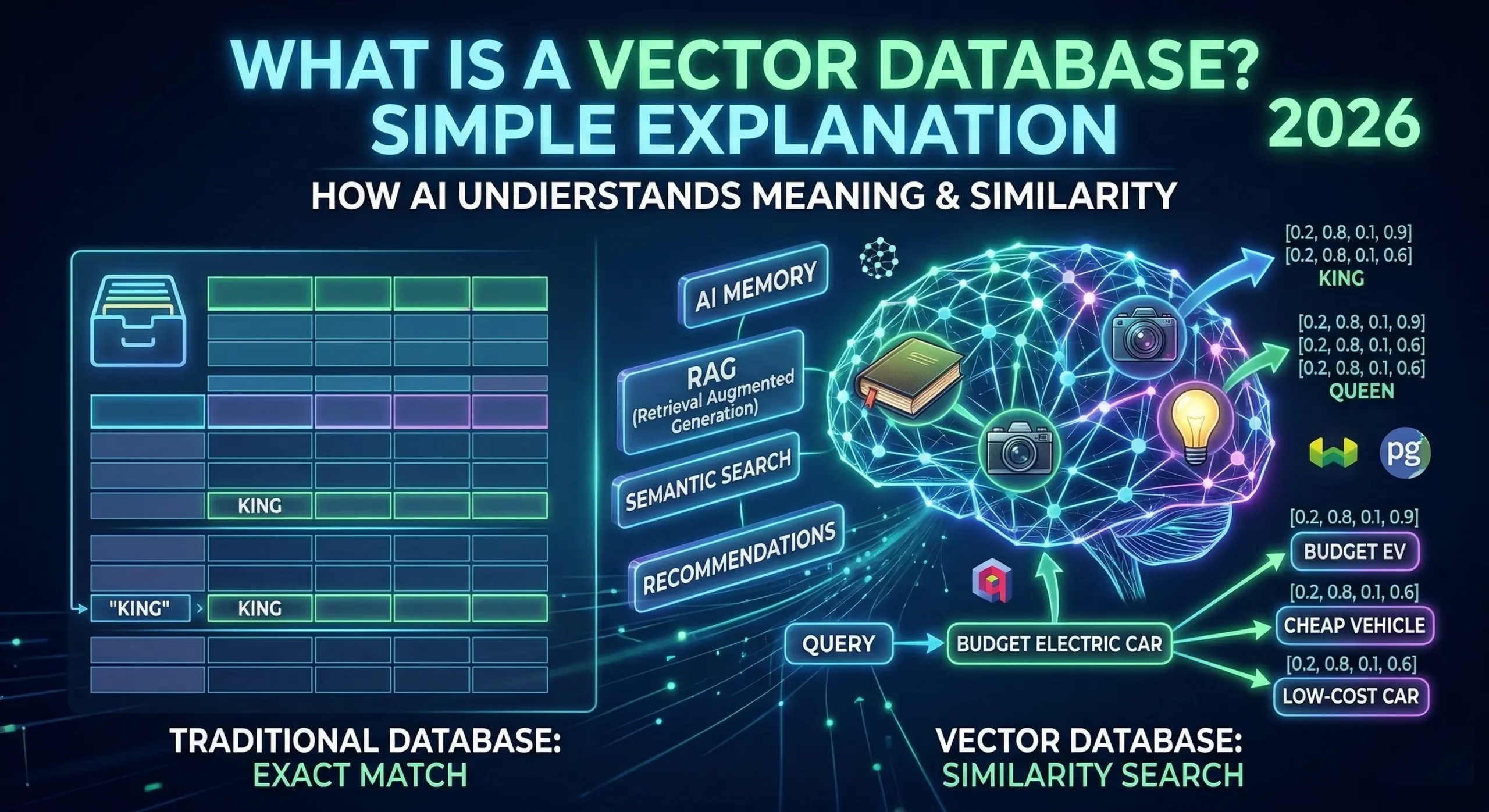
A vector database is a special type of database that stores data as numbers — specifically as lists of numbers called vectors — and lets you search for things based on meaning and similarity rather than exact keyword matches.
Think of it this way:
- A regular database finds things by exact match — “find all users named John”
- A vector database finds things by similarity — “find all users who are similar to John”
This ability to find similar things rather than exact things is what makes vector databases the backbone of every modern AI application.
What is a Vector? (The Building Block)
Before understanding vector databases, you need to understand what a vector is.
A vector is simply a list of numbers that represents the meaning of something — a word, a sentence, an image, an audio clip, or a video.
For example, the word “King” might be represented as:
[0.2, 0.8, 0.1, 0.9, 0.4, 0.7, …]
And the word “Queen” might be:
[0.2, 0.8, 0.1, 0.9, 0.4, 0.6, …]
Notice how similar these numbers are? That is because King and Queen are semantically similar — they share meaning. A vector database understands this similarity and can find related concepts even if the exact words are different.
These number lists are called vector embeddings, and they are created by AI models called embedding models — like OpenAI’s text-embedding-ada or Google’s Gemini embedding model.
How Does a Vector Database Work?
Here is the step-by-step process of how a vector database stores and retrieves information:
Step 1: Data Goes In
You have raw data — text, images, audio, or video. An embedding model converts this data into a vector (list of numbers) that captures its meaning.
Step 2: Vectors Are Stored
These vectors are stored in the vector database along with the original content they represent — like a label on each vector.
Step 3: You Search
When you type a search query, the same embedding model converts your query into a vector too.
Step 4: Similarity Search
The database compares your query vector against all stored vectors using mathematical distance calculations — it finds vectors that are “closest” in meaning to your query.
Step 5: Results Come Back
The database returns the most similar results — ranked by how close they are to what you searched for.
Real-World Example:
You search for “affordable electric cars” — a vector database does not just find pages with those exact words. It also finds results about “budget EVs”, “cheap battery vehicles”, and “low-cost Tesla alternatives” — because all of these are semantically similar.
Vector Database vs Traditional Database
This is the most important distinction to understand:
| Feature | Traditional Database | Vector Database |
|---|---|---|
| Data Type | Structured (rows & columns) | Unstructured (text, images, audio) |
| Search Method | Exact keyword match | Similarity / semantic search |
| Query Example | WHERE name = 'John' | “Find users similar to John” |
| Best For | Invoices, orders, user accounts | AI apps, recommendations, chatbots |
| Speed at Scale | Fast for exact queries | Fast for similarity queries |
| Understands Meaning | ❌ No | ✅ Yes |
| Examples | MySQL, PostgreSQL, MongoDB | Pinecone, Qdrant, Weaviate, pgvector |
A traditional database is like a filing cabinet — great for finding an exact folder. A vector database is like a human brain — great for finding things that feel similar even if they are not identical.
Why Do AI Applications Need Vector Databases?
In 2026, every serious AI application uses a vector database for one core reason — AI needs to remember and retrieve information based on meaning, not keywords.
Here are the specific reasons AI needs vector databases:
1. Long-Term Memory for AI Agents
Tools like OpenClaw use vector databases (Qdrant or pgvector) to store everything you have ever told them — your preferences, your timezone, your past commands — so they remember context across conversations.
2. RAG (Retrieval Augmented Generation)
This is the technology behind “Chat with your PDF” tools. Your documents are stored as vectors, and when you ask a question, the AI retrieves the most relevant chunks before generating an answer. Without a vector database, the AI cannot access your documents.
3. Semantic Search
Google, LinkedIn, and Spotify all use vector databases to understand the meaning of searches — not just match keywords. When you search for “sad songs for rainy days,” the vector database finds emotionally matching music even if none of the songs contain those exact words.
4. Recommendation Systems
Netflix, Amazon, and YouTube use vector databases to find content similar to what you have watched or bought before. Your viewing history becomes vectors, and the system finds videos with the closest vector distance — meaning the most similar content.
5. Image & Video Search
Pinterest’s visual search, Google Lens, and reverse image search all work because images are converted to vectors and stored in vector databases — letting you search by picture instead of by words.
How Does Similarity Search Actually Work?
Under the hood, vector databases use a technique called Approximate Nearest Neighbor (ANN) search to find the most similar vectors quickly — without comparing every single stored vector to your query.
The two most popular algorithms are:
HNSW (Hierarchical Navigable Small World)
Think of it like a multi-level map. The database navigates through layers of connected vectors — zooming in from broad regions to specific matches — without scanning everything. This is extremely fast and is used by Qdrant, Weaviate, and most modern vector databases.
IVF (Inverted File Index)
This method divides the vector space into clusters. When you search, it only looks inside the most relevant cluster — dramatically reducing the number of comparisons needed.
Both methods make a small accuracy trade-off for massive speed gains — which is perfectly acceptable for AI applications where “very similar” is good enough.
Best Vector Databases in 2026
Here are the top vector database tools used in production AI applications today:
| Tool | Best For | Hosting | Free Tier |
|---|---|---|---|
| Pinecone | Managed cloud, zero ops | Cloud only | ✅ Yes |
| Qdrant | Self-hosted, high performance | Cloud + Self-hosted | ✅ Yes |
| Weaviate | GraphQL + AI-native | Cloud + Self-hosted | ✅ Yes |
| Milvus | Large-scale enterprise | Self-hosted | ✅ Yes |
| pgvector | PostgreSQL users | Self-hosted | ✅ Yes |
| Chroma | Local development & prototyping | Local only | ✅ Yes |
| Redis Vector | Real-time low-latency | Cloud + Self-hosted | ✅ Limited |
Which One Should You Use?
- Beginner / Quick prototype: Use Chroma — runs locally, zero setup
- Production AI app: Use Pinecone — fully managed, scales automatically
- Self-hosted privacy-first (like OpenClaw): Use Qdrant — best performance locally
- Already using PostgreSQL: Use pgvector — add vector search to your existing database
Real-World Use Cases of Vector Databases in 2026
Vector databases power more applications than most people realize:
| Use Case | How Vectors Help |
|---|---|
| AI Chatbots (RAG) | Store documents so AI can answer questions from your data |
| E-Commerce Search | Find products similar to what you are viewing |
| Music Recommendations | Spotify finds songs with similar mood and tempo |
| Fraud Detection | Find transactions similar to known fraud patterns |
| Drug Discovery | Find molecules with similar chemical structure |
| Code Search | GitHub Copilot finds similar code snippets |
| Customer Support | Match customer questions to similar resolved tickets |
| Face Recognition | Match faces by vector similarity |
| Legal Research | Find similar past cases and rulings |
| OpenClaw Memory | Remember user preferences across sessions |
Vector Database in Simple Terms — Final Analogy
If you still find vector databases confusing, here is the simplest possible explanation:
Imagine your brain stores memories — not as exact text files, but as feelings and associations. When you smell fresh bread, your brain finds all memories associated with warmth, comfort, and home — not by matching the word “bread” but by similarity of feeling.
A vector database does the same thing for AI — it stores data as mathematical “feelings” (vectors) and retrieves results by similarity of meaning.
That is exactly why AI in 2026 feels so intelligent — it is not just matching keywords, it is understanding meaning.
Conclusion
Vector databases are the invisible engine powering almost every AI application you use in 2026 — from chatbots and recommendation systems to image search and AI agents like OpenClaw.
To summarize what we covered in this vector database explained 2026 guide:
- A vector database stores data as numbers (vectors) that represent meaning
- It finds results by similarity, not exact keyword match
- It is fundamentally different from traditional databases like MySQL
- It powers RAG, AI memory, semantic search, and recommendations
- Best tools are Pinecone, Qdrant, Weaviate, and pgvector
- Every AI agent, including OpenClaw, uses a vector database for memory
As AI continues to grow in 2026, understanding vector databases is no longer optional for developers, marketers, and business owners — it is essential knowledge for anyone working in the digital world.
Tags: vector database explained 2026, what is vector database, how vector database works, vector embeddings, best vector database 2026, AI database, Pinecone Qdrant comparison